Crowview note prompts Chinese, not sure how to set it up?
Here are the relevant user manuals and other materials, where you can view the relevant operations.
https://www.elecrow.com/download/product/CRV12014K/CrowView_Note_User_Manual.pdf
Crowpi requires a password to be entered, but even after entering the password, it is not possible to access the desktop; only the terminal page is accessible.
(1) Press Ctrl + Alt + F2 to enter the terminal. If this does not work, replace F2 with F1~F7, and then try any key that can enter the terminal.
(2) Enter startx in the terminal and press the Enter key.
(3) If this still does not work, re-burn the image system.https://drive.google.com/drive/u/0/folders/1omz8i4UVU-chItRekNViZEYqbhsLtCnn
There are three pins marked “UART” on the bottom of my CrowPi. Which UART port do these connect to?
This UART port can be used for communication, such as connecting to a sensor with a UART interface or connecting to a device with a main control chip for communication.”
Could you please provide CAD for the Elecrow CrowPanel PICO HMI 2.4'' Display (https://www.elecrow.com/wiki/CrowPanel_Pico_HMI_Display-2.4.html)?
We are very sorry that we don't have the CAD file.
We only have .stp format 3D files for this product (3D file link: https://github.com/Elecrow-RD/CrowPanel-Pico-Display-2.4-inch-320240/tree/master/3D%20file).
How do I switch my ThinkNode M1 from 868mhz to 915mhz?
We are sorry, this product doesn‘t support switching the frequency.
What Arduino development boards are built into the Elecrow All-in-One Arduino Starter Kit?
For development board, please select Arduino Uno in Arduino IDE.
The link to the course code is below:
https://github.com/Elecrow-RD/All-in-one_Starter_Kit_for_Arduino
The code uploads successfully without any compilation errors, but the screen doesn't even light up. I tried adjusting the display configuration and it either stays the same or the screen flickers and there is a white line moving across the screen.
In order to solve your micro problem, please check the following issues:
1. Your esp32 development board version should be 2.0.14/2.0.15, other versions may cause problems.
2 Please follow the tutorial to install and modify the library files, or use the modified library files we already have (no need to install or modify, just download and put into the arduino runtime library path)
Library version:
Ivgl: 8.3.3
TFT_eSPI: 2.5.0
LovyanGFX: 1.1.8
Library file download link:
Operation method reference:https://www.elecrow.com/wiki/ESP32_Display_7.0-inch_HMI_Arduino_Tutorial.html#build-the-project-with-arduino-ide
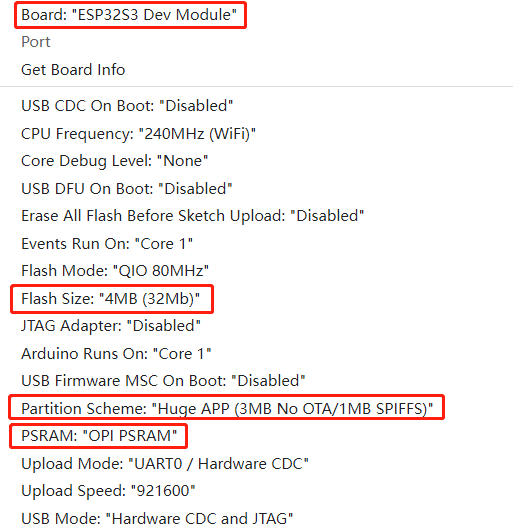
In the tool, follow these steps to configure
Bluetooth utilization
CrowPanel 7.0 does not support Classic Bluetooth, only Low Power Bluetooth.
If connected through the mini-HDMI connector and also connected to the left USB-A connector, can Crowview be charged through the left USB-A connector (not just for keyboard/mouse connection, but also for power supply)?
The only port that charges crowview note is the DC power port, none of the others can charge crowview note
Having trouble connecting to a Raspberry Pi 5. I have connected the cable as per the attached diagram but the screen always shows no signal. Thank you very much for your help and hopefully it will work.
1Try another HDMI cable to rule out cable problems.
2Connect the monitor to another computer to see if the display is normal.
3Please make sure to modify the “config.txt” file according to the following steps: (the modification method is the same for Raspberry Pi 4 and Raspberry Pi 5)