售后常见问题
搜索条件
Product: Crowpanel 7 advance SKU: DIS02170A-1
Question:
how to use UART1 for comunicate with anather MCU?
Answer:
You can use UART1 for communication with another MCU.
The Crowpanel communicates with another MCU via the serial port.
If necessary, you can refer to the program in our course (below) or search online for relevant information/example programs.
https://www.elecrow.com/pub/wiki/HMI_Display_course.html#version-12_1
https://youtu.be/W3LHGZRx7Jw?list=PLwh4PlcPx2Gfrtm7TmlARyF4ccTmIy-gK
Product: RC050S SKU: DIS00005R
Question:
can I have two usb supplies from two sources plugged into the display(RC050S) at the same time
Answer:
Both the power port and the touch port can be connected to a USB cable simultaneously. The voltage requirement for both ports is 5V.
Product: CrowPanel Advance 7.0-HMI ESP32 AI Display;DIS02170A SKU: DIS02170A
Question:
I have a question regarding the switch settings on the CrowPanel Advance 7.0, I wish to have a tft card plus a nRF2401 module on my display the switches seem to inticate it has to be one or the other ie 10 tft 01 WMmodule 11 is tft plus mic . so thats no good. is it possible to have both
Answer:
You can only choose one of these functions. All the pins have been used up. There are no more leftovers.
but We are planning to launch a new 7-inch display with the ESP32-P4 as the main controller in early September 2025. This device may allow you use TFT card and the module simultaneously. You can explore the product specification after it start to be sold on our website.
Product: RC070S ; DIS78950R; SKU: DIS78950R
Question:
could you kindly provide the 3D design file (.stl or similar) for the Elecrow RC070S enclosure/case, so that I can 3D print it and use it to cover the display?
Answer:
We're sorry, we don't have the 3D file for this enclosure. You can design one yourself.
If you have a bulk order, we might be able to apply to the company to have one made for you.( (It depends on whether the company approves this.)
Product: DIS85101D;Elecrow 10.1inch Display IPS 1280x800 Acrylic Case Touch Screen SKU: DIS85101D
Question:
when connected with windows OS computer, the touch function does not work ,why ?
Answer:
Our testing confirmed that the touch function is available, and we also used Windows 11.
No driver is required when using Windows.
1. Please check that the USB cable is functioning properly. Some USB cables only provide power and not data.
2. Please confirm that the USB cable is connected to the computer's USB port via the touch port on the screen.
3. If the customer is using this monitor as a secondary display, when touching the 10.1-inch screen, the actual touch feedback will appear on the secondary display.
4. Please note that windows XP OS does not support touch function.
Product: CrowPanel -ESP32 Display-1.28inch(R) ; DIS12824D SKU: DIS12824D
Question:
How to use CrowPanel -ESP32 Display-1.28inch(R) ?
Answer:
Let you take a look at these pages. All the materials/tutorials are placed here.
https://www.elecrow.com/wiki/CrowPanel_ESP32_1.28-inch_Round_Display.html#arduino-ide
https://www.elecrow.com/wiki/ESP32_1.28-inch_Round_Display_Tutorial.html#tutorial-on-arduino-ide
https://www.youtube.com/watch?v=THPj-lZowfc&t=64s
https://www.youtube.com/watch?v=TfMFJjsfvFo
Product: All products SKU: -
Question:
Can I combine multiple orders into one shipment?
Answer:
If your orders have not been shipped yet, you can contact our staff (order@elecrow.com) to consolidate the orders.
Product: Thinknode M1 SKU: CIL12901M-1
Question:
Why Thinknode M1 has no GPS signal?
Answer:
Please try the following.
1 Have you turned on the GPS switch?
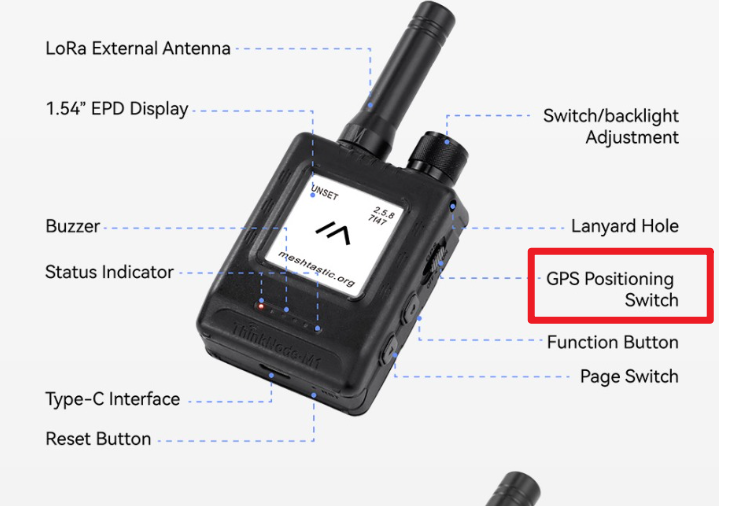
2 In addition, the device must be placed outdoors to have a GPS signal. Is the device placed outdoors?
3 Maybe you have made a mistake in the settings in the app. I suggest you try this: click Restore Factory Settings in the app, and then turn on the GPS switch on the device
4 Please update your device to the latest firmware (both stable and unstable) and try again. The firmware update link is below.
https://flasher.meshtastic.org/
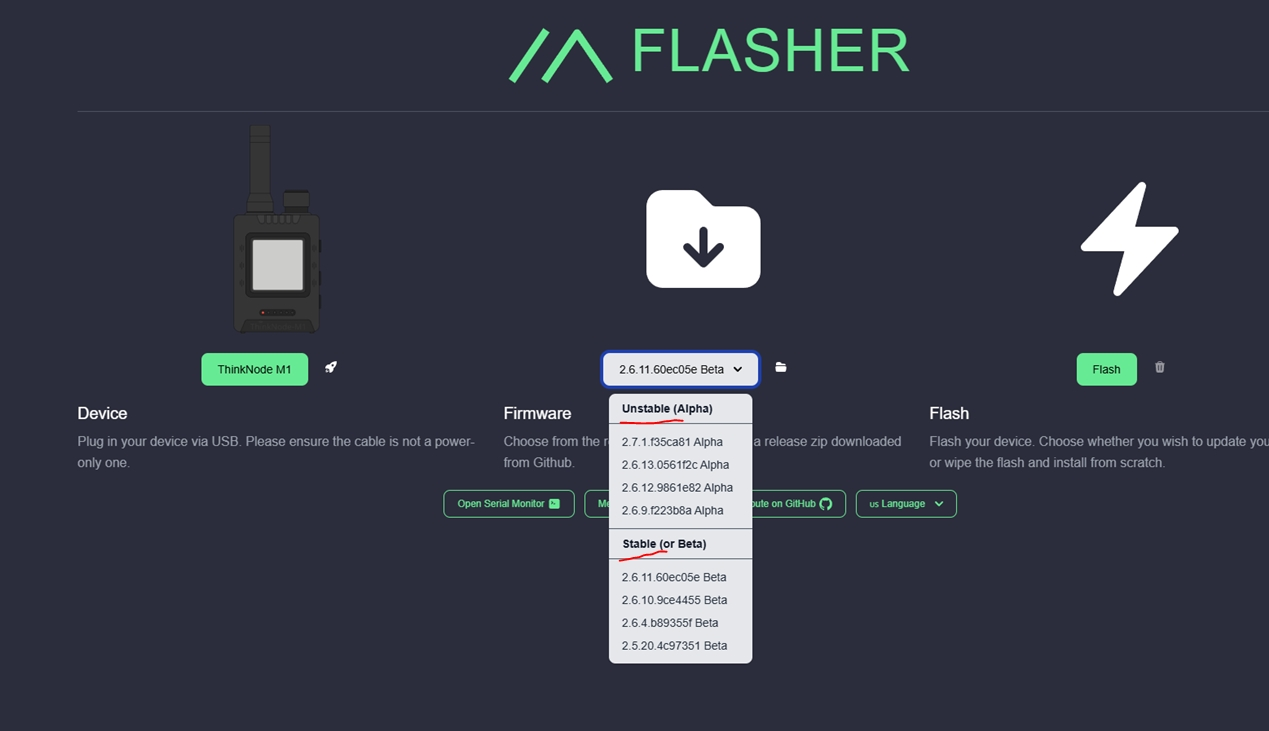
5 If the problem still exists, please open the case and check if the antenna is loose or not fastened properly. If so, adjust the antenna and fasten it properly and try again.
Product: Crowpanel 7 inch advance SKU: DIS02170A-1
Question:
What is the difference between CrowPanel Advance 7.0-HMI ESP32 AI Display v1.0 and v1.2
Answer:
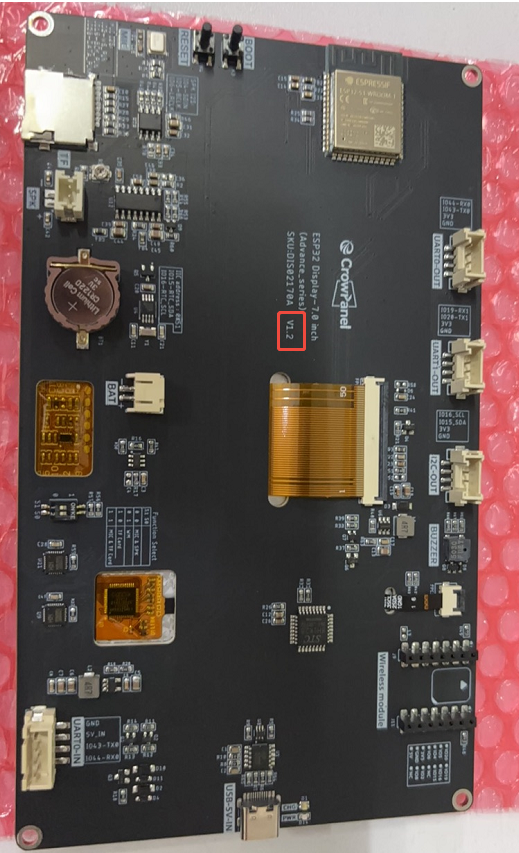
hardware version V1.2 has the following differences compared to previous version v1.0:
① Version v1.2 supports adjusting screen brightness.
② Version v1.2 uses different codes, including factory/course codes, etc.
Product: CrowPanel hmi basic 5 inch and Dallas DS18b20 SKU: DIS07050H
Question:
Pin 38 on the 5-inch screen cannot be used with Dallas DS18b20, and OneWire is invalid. Is there any way to solve this problem?
Answer:
Pin 38 of the Esp32s3 does not support onewire. You can only use the i2c pin or an advanced series screen.